Team Management for Your Marketing Team in One Workspace
Bring your team into one MarketNOW workspace. Invite members, give each person the right role, decide which apps each person or team can open, share one credit balance and keep a record of every change.
What is team management in MarketNOW?
Team management is how you give several people access to the same marketing tools while keeping control of who can do what. In MarketNOW it lives in the Organization workspace: one place for your members, roles, teams, credits and activity.
Admins invite people, set their roles and app access, and see how the shared credits are used. Every change is recorded, so you always know who did what and when.
How to set up your team
- Request a workspace — Tell us about your business and team. MarketNOW reviews the request with you and switches the Organization workspace on.
- Invite your team — Send email invitations with a role already chosen. Each invite link is valid for 14 days.
- Set roles and access — Pick a built-in role or your own, group people into teams, and choose which apps each person or team can open.
- Keep an eye on it — See seats, credit use by member and a full activity log of every change.
Manage your people
- Email Invitations — Invite by email with a role chosen up front. Resend, revoke or send a new link, or copy the link if the email doesn't arrive.
- Built-in Roles — Nine roles made for marketing and sales teams, from Organization Admin and Manager to Sales Executive, Email Specialist and Viewer.
- Custom Roles — Copy a built-in role, give it a name and switch whole apps on or off for everyone who has it.
- Teams — Group members into teams, add or remove people, and give each team its own app access.
- Deactivate or Remove — Deactivate someone to pause their access and free their seat, or remove them from the workspace while keeping everything they created.
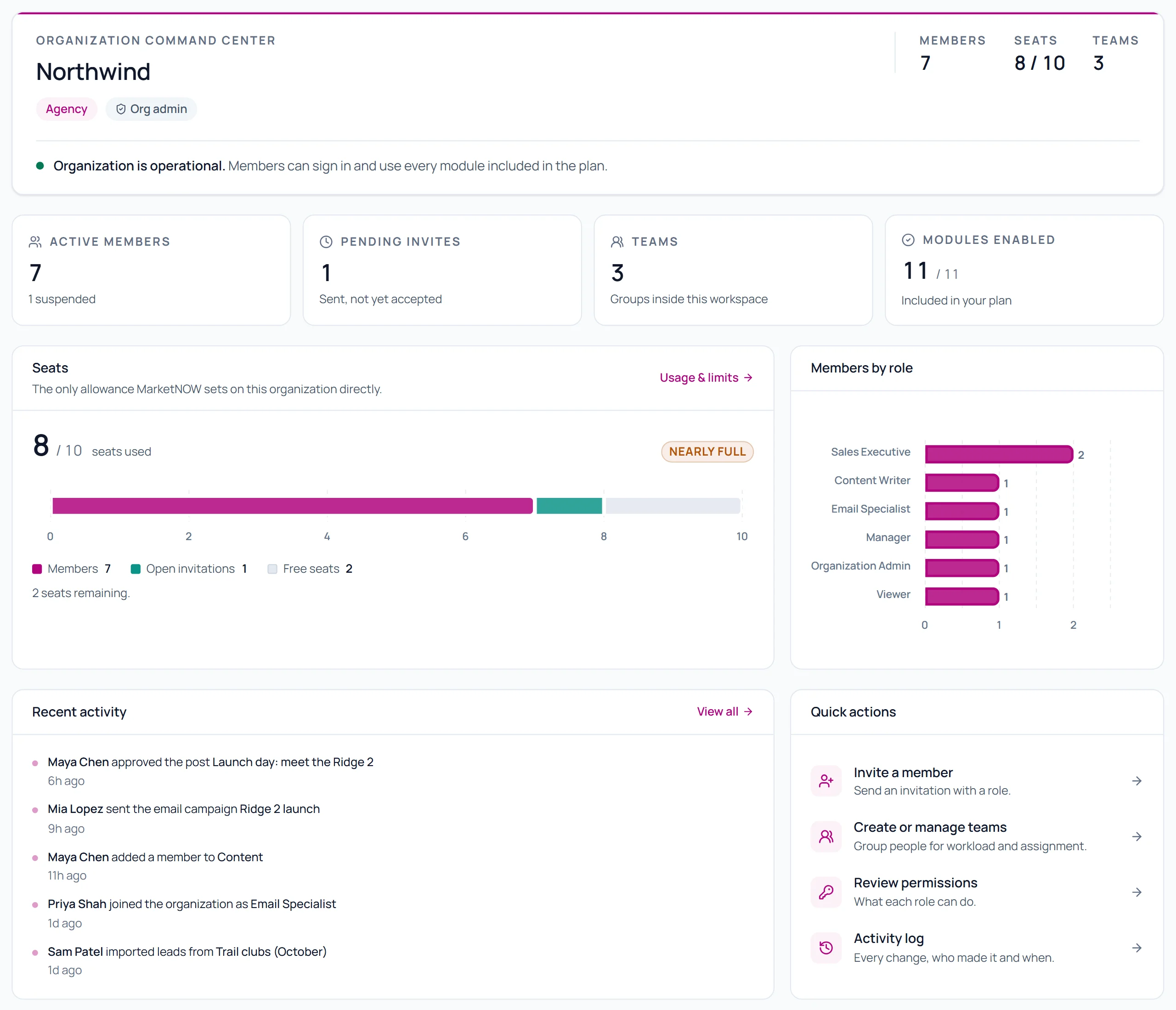
See your team at a glance
A screenshot from the MarketNOW dashboard with sample data for an example team, not a real customer.
Control who sees which apps
Eleven apps, from SEO and Rank Tracking to Lead Intelligence, Bulk Email and Social Publisher, can be switched on or off.
- Access by Person — Turn an app on or off for one member, on top of what their role allows.
- Access by Team — Turn apps on or off for a whole team, or let the team inherit from each member's role.
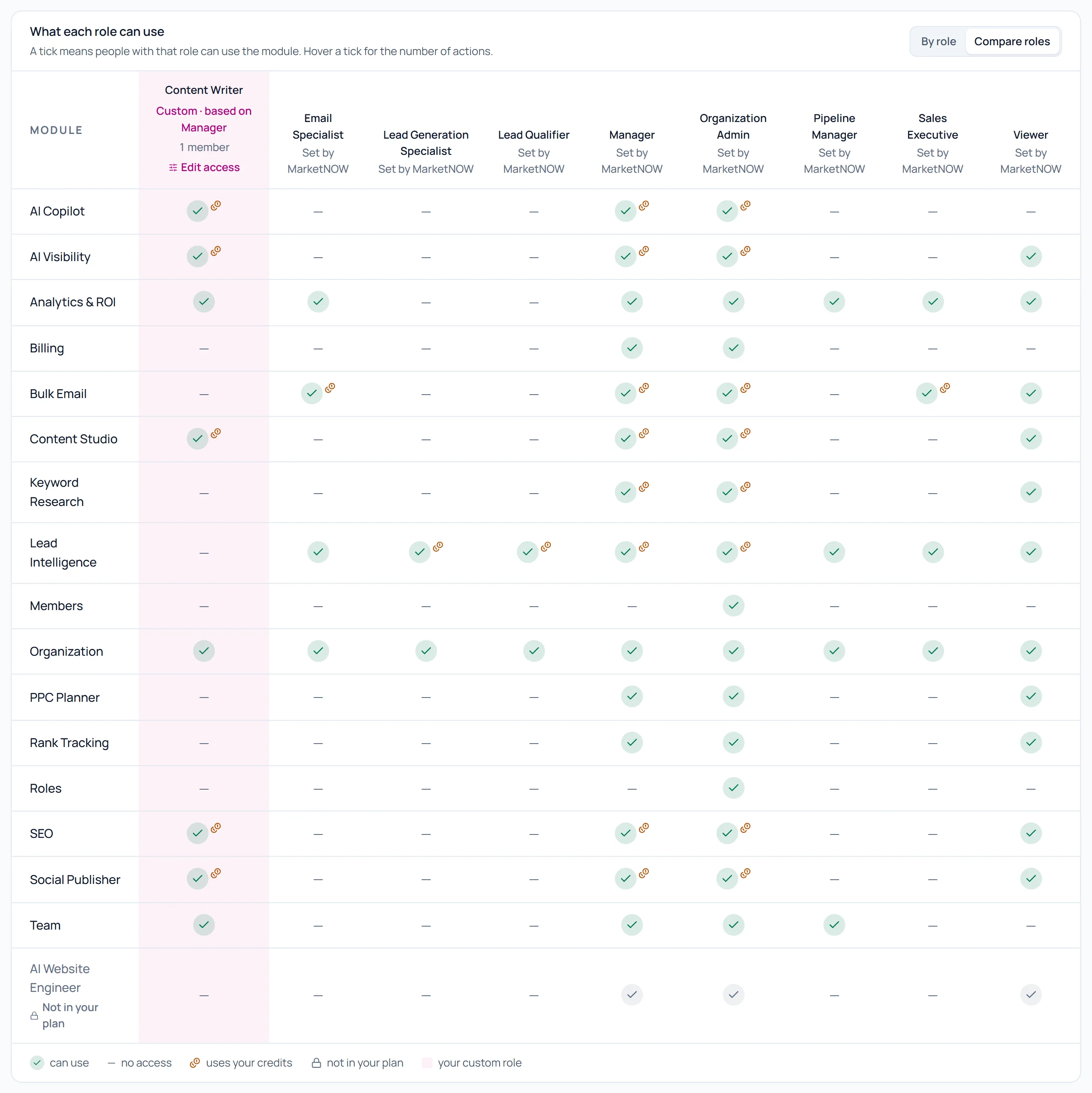
- Roles and Permissions at a Glance — See what each role can use, or compare roles side by side, including the actions that spend credits.
- Within Your Plan — Access never goes beyond the apps your plan includes, so nobody can switch on a tool you haven't got.
Seats, credits and connections
- One Shared Credit Balance — Members use the organization's credits, so the whole team works from one balance and one plan.
- Usage by Member — See how many credits each member has used in the current period.
- Seats — Seats used and seats left, counting active members and open invitations, with a warning when you are nearly full.
- Connections Overview — See which social and email accounts your members have connected, and which ones need reconnecting soon.
A record of every change
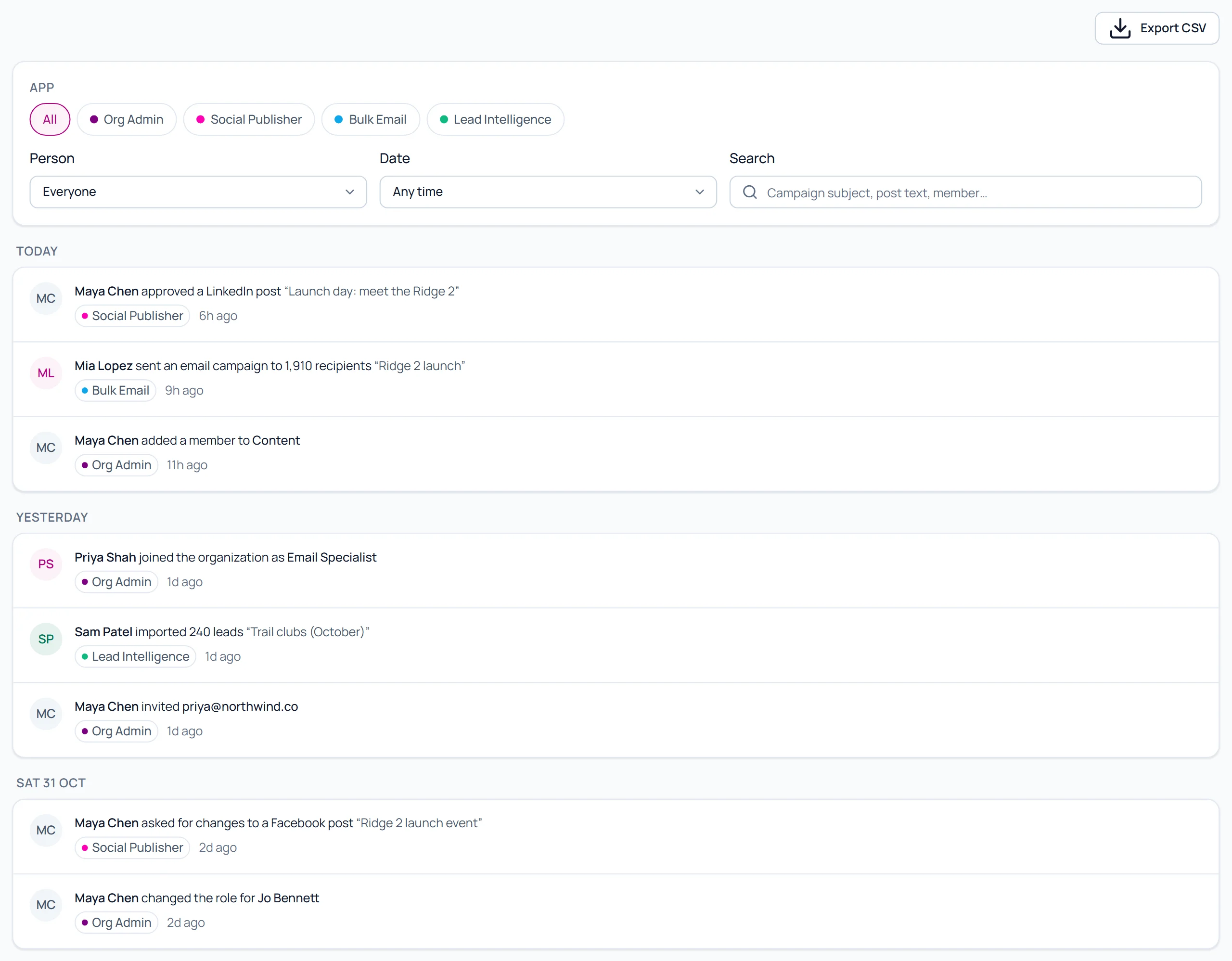
- Activity Log — Invitations, role changes, teams, access changes, credit settings, published posts, approvals, email campaigns and lead imports, with who did it and when.
- Filters and Search — Filter by app, person and date range, or search for a campaign subject, post or member.
- CSV Export — Export the filtered log to CSV, up to 5,000 rows at a time, for your own records.
Roles and activity, side by side
Screenshots from the MarketNOW dashboard with sample data for an example team.
Seats on each plan
The Pro plan includes 3 seats, Agency 10 and Custom unlimited. Growth and the free trial are for one person.
A seat is used by each active member and each open invitation; deactivated members don't use one. To add seats, contact MarketNOW.
Bring Your Whole Team Into MarketNOW
Request a team workspace, invite your people and keep control of roles, access and credits in one place.
Frequently asked questions
What is team management software?
Team management software lets several people work in one account while an admin controls who has access to what. MarketNOW's Organization workspace handles members, roles, teams, app access, shared credits and an activity log for your marketing team.
How do I get a team workspace?
Send a request from the Organization page in your dashboard. MarketNOW reviews it with you and switches the workspace on for your account; you become its admin and can start inviting your team.
How many people can I add?
The Pro plan includes 3 seats, Agency 10 and Custom unlimited. Active members and open invitations use seats; to add more, contact MarketNOW.
Which roles are available?
Nine built-in roles: Organization Admin, Manager, Lead Generation Specialist, Lead Qualifier, Sales Executive, Pipeline Manager, Email Specialist, Member and Viewer. You can also create custom roles from them.
Can I choose which tools each person can use?
Yes. Switch apps on or off for a member, a team or a custom role. Access never goes beyond the apps included in your plan.
Do team members share credits?
Yes. Members use the organization's single credit balance, and admins can see how many credits each member has used this period.
Is there an audit log?
Yes. The activity log records member, role, team and access changes as well as published posts, approvals, email campaigns and lead imports. Filter it and export it to CSV.