
B2B Lead Intelligence Software to Find the Right Business Customers
Finding potential customers begins with understanding which companies may need what you sell. MarketNOW finds the decision makers at the companies you choose, scores every lead and keeps your follow-ups in a built-in CRM.
What is B2B lead intelligence?
B2B lead intelligence is the process of collecting, analyzing and organizing information about potential business customers.
Instead of approaching every company with the same message, teams use relevant business information to understand who they want to reach, which problems those businesses may face and how their offering could help.
MarketNOW's B2B lead intelligence software covers the whole path: finding the right people, judging which leads are worth your time, and keeping track of every conversation.
Three ways to find B2B leads
Start with your target market and ideal customer. Effective prospecting is about fit and relevance, not the number of leads collected. Each search returns up to 50 results.
- Find Customers — Paste up to 10 target companies, or describe your ideal customer by industry, headquarters country and company size. MarketNOW finds the companies, then the people, filtered by job title, seniority and department.
- Company Database — Search companies by industry, size, country or keyword, tick the ones that fit, then pull their decision makers: 10, 25 or 50 people at a time.
- Keyword Search — See the businesses that rank on Google for a search your customers would make, such as “bakery in Hyderabad”, with the emails and phone numbers their own websites publish.
What you see for every lead
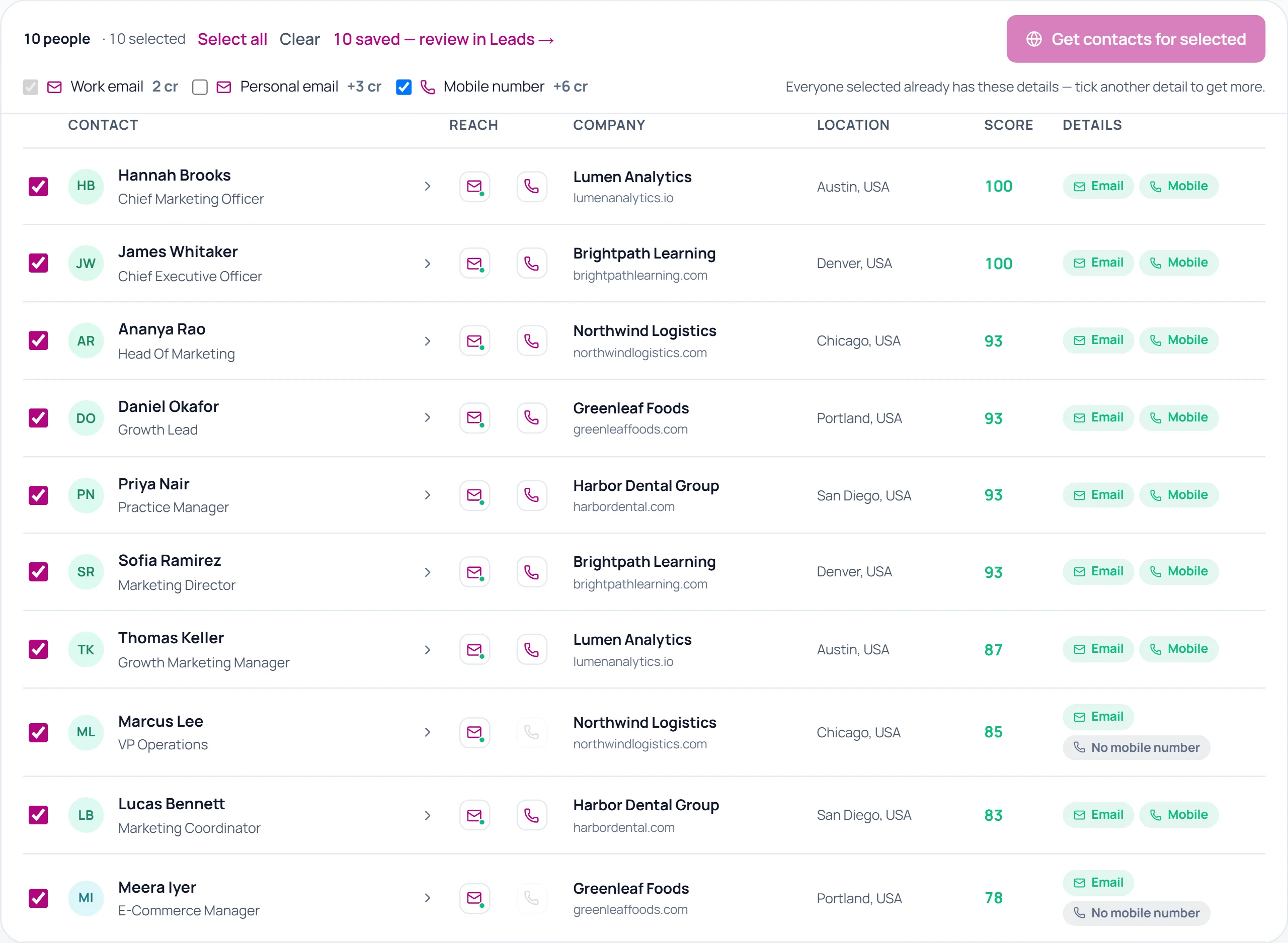
- Contact Details — Name, job title, seniority, department, work email and LinkedIn profile, with the company's name, website and location.
- Email Status — Each email comes with the deliverability status the data provider reports, such as Verified, Accept-all or Unknown, so you know which addresses to trust.
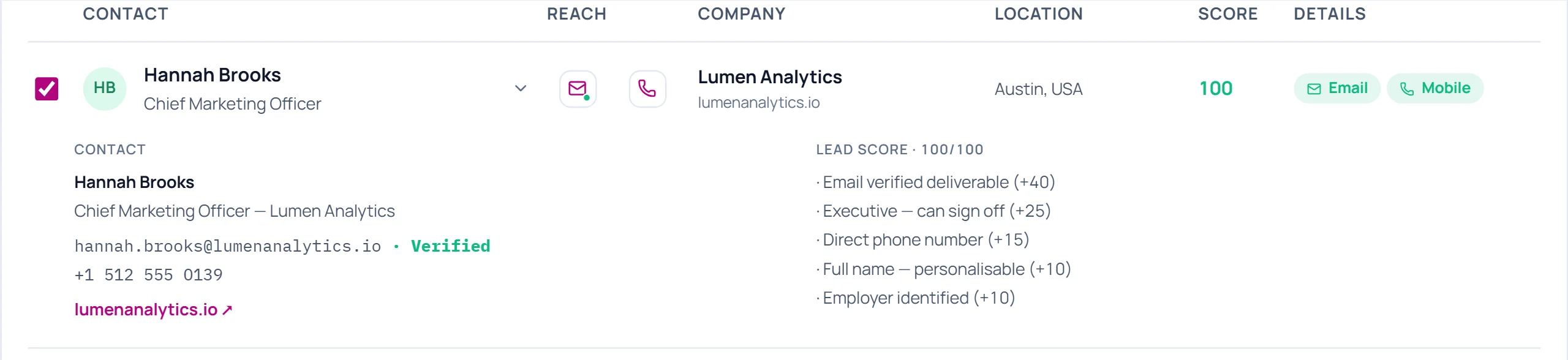
- Lead Score — A 0–100 score that shows its working: email quality, seniority, a phone number, a full name and a known employer.
- AI Fit Ranking — Optionally let AI rank your results by fit for your offer, with a one-line reason for each person.
- Marketing Opportunity — A 0–100 score from the SEO gaps on each company's homepage, useful when you sell marketing services.
- Excel & CSV Export — Download results as Excel or CSV, or send them straight to an email campaign.
See who to contact, and why
Example data for made-up companies and people, shown in the real MarketNOW dashboard. Your searches return real people at the companies you choose.
Organize every lead in a built-in CRM
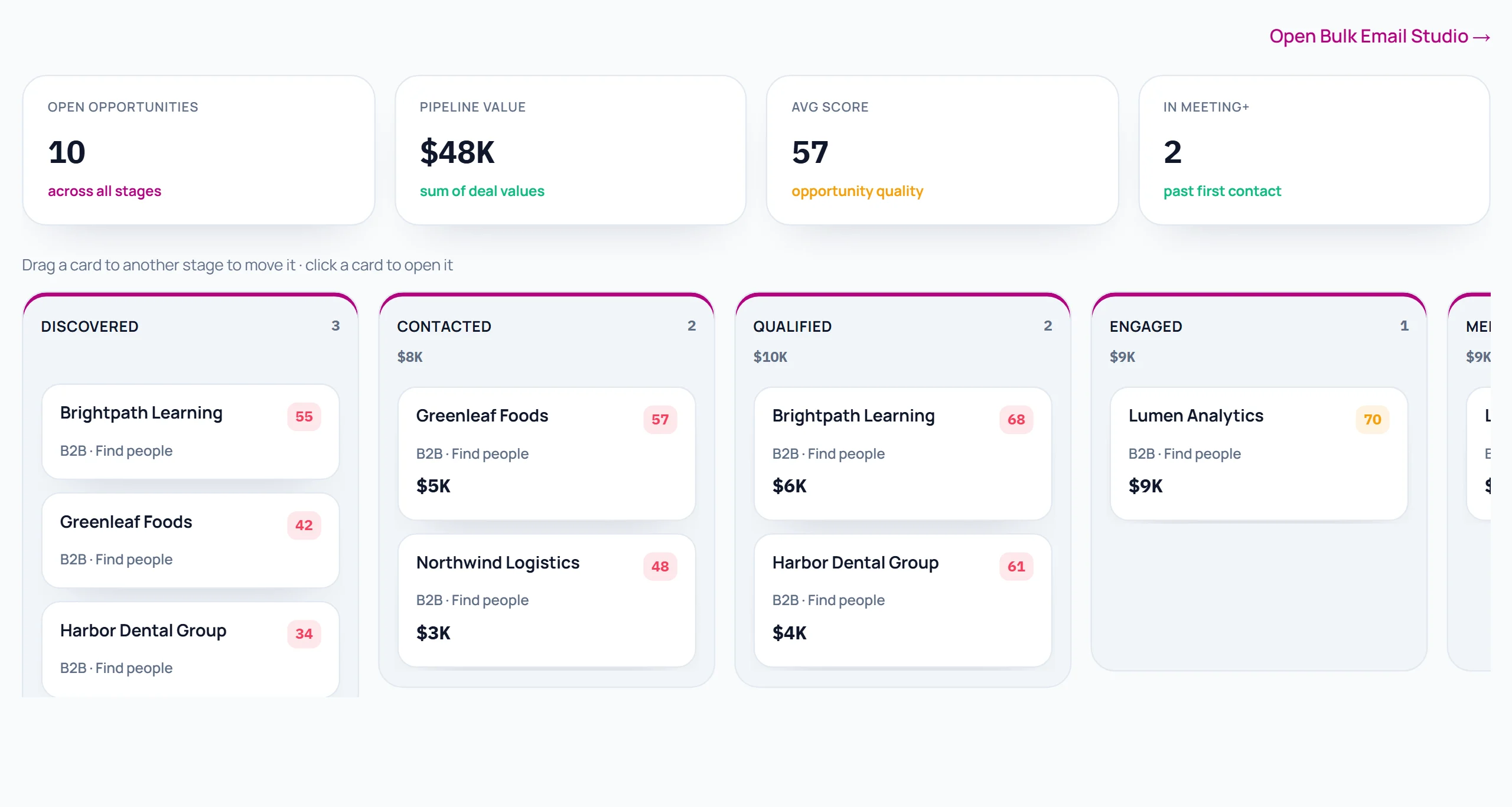
Keep prospect details structured so your team can review opportunities consistently. Saved leads land in a pipeline with ten stages, from Discovered and Contacted to Proposal, Won and Lost. Drag leads between stages on a board, or move many at once.
Log calls, emails, meetings and notes, set follow-up dates, and work from a board of what's overdue, due today and coming up. A won deal records its revenue; a lost one records the reason.
Already have a list? Import a CSV or Excel file of up to 20,000 rows, map the columns, and undo the import if something looks wrong.
Your sales pipeline, stage by stage
Example data for made-up companies, shown in the real MarketNOW dashboard.
Turn lead research into meaningful outreach
Lead intelligence becomes valuable when it helps you communicate more effectively. Use your research to understand a business's likely interests and prepare messages that explain how your product addresses a relevant need.
MarketNOW's AI can draft a short first email for any contact, with a subject line, for you to edit. Send it, or a whole campaign, from your own mailbox through MarketNOW's email tools, and see sends and opens on each lead's timeline.
Personalized, respectful communication works better than the same generic message sent to an unrelated list. Follow the email and privacy rules that apply to you: an opt-out recorded on a lead also stops your email campaigns to that address.
Know what the data can and can't tell you
Contact and company details come from a third-party contact data provider and from companies' own websites. Coverage varies by country and industry, and some fields can be empty: not every contact comes with a phone number.
Keyword search shows businesses that rank on Google for a search. It is not intent data: it can't tell you who searched for what. Before contacting a prospect, check that the information is current and appropriate for the intended use.
Combine lead intelligence with your marketing tools
Lead Intelligence sits next to MarketNOW's SEO, AI visibility and email tools. Send any list of leads to a bulk email campaign, use saved segments as campaign recipients, and check a prospect's marketing-opportunity score before you reach out.
Explore B2B Lead Intelligence With MarketNOW
Build a more informed approach to researching businesses and finding the customers who fit what you sell.
Frequently asked questions
What is the difference between lead generation and lead intelligence?
Lead generation focuses on finding potential customers. Lead intelligence adds information and context that help you evaluate those prospects, such as role, seniority, email status and fit.
Where does the lead data come from?
People and company details come from a third-party contact data provider. Keyword search reads Google's results and the companies' own websites. Coverage varies by country and industry.
Are the email addresses verified?
Each email shows the status the data provider reports: Verified, Accept-all, Webmail, Unknown or Invalid. Only addresses marked Verified have passed a deliverability check, and the status also feeds the lead score. Check important addresses before a large campaign.
How many leads can I get each month?
Each paid plan includes a monthly lead allowance, shown on the pricing page. One lead is one record delivered, and searches that find nothing don't count. The free trial lets you explore Lead Intelligence but doesn't include contact searches.
Can I export my leads or import my own?
Yes. Export search results as Excel or CSV, or send them straight to an email campaign. To bring in leads you already have, import a CSV or Excel file of up to 20,000 rows.
Does finding a lead guarantee a sale?
No. A lead is a potential opportunity. Successful conversion depends on relevance, timing, customer needs and the quality of your offering.
Why is data accuracy important in B2B prospecting?
Incorrect or outdated information wastes time and can damage trust. Verify important details before relying on them for business decisions or outreach.