
Email Campaign Software That Sends From Your Own Gmail or Outlook
Send personalised bulk email campaigns from the inbox you already use. Upload a list or pick a lead segment, write the email with AI, schedule it, and see who opened it, with unsubscribes and do-not-email lists handled for you.
What is email campaign software?
Email campaign software helps you send one email to many people at once, personalised for each of them, and see how it performed. It handles the list, the sending pace, unsubscribes and the results.
MarketNOW sends your campaigns from your own Gmail or Outlook account, so they come from your real address, and keeps them next to your SEO, social and lead tools.
How to send a bulk email campaign
- Connect your inbox — Sign in with Gmail or Google Workspace, or with Outlook or Microsoft 365. No passwords or server settings.
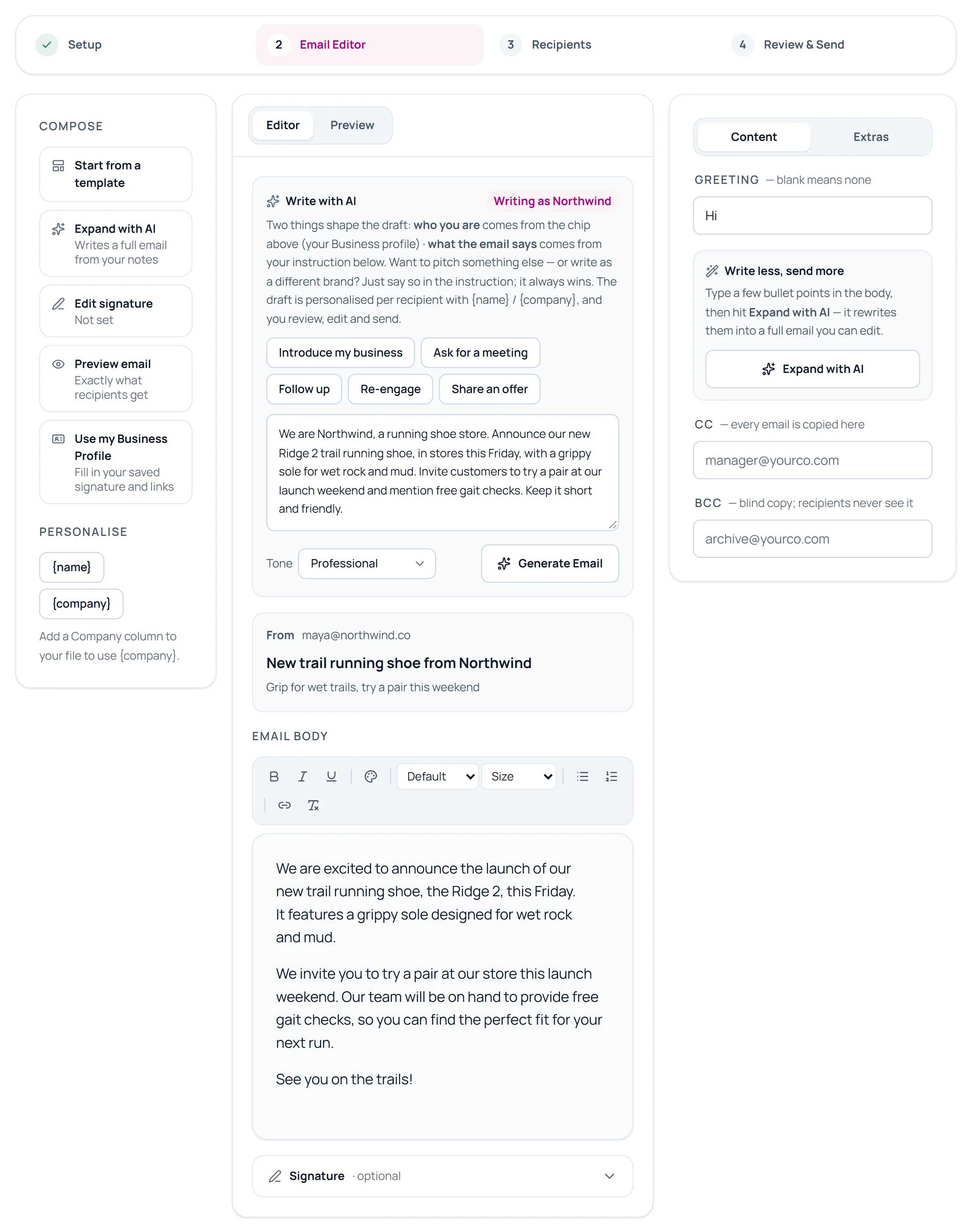
- Write the email — Start from a template or let AI write it, then personalise it with each person's name and company.
- Add recipients — Upload a CSV or Excel file, paste addresses, or pick a saved list or a lead segment.
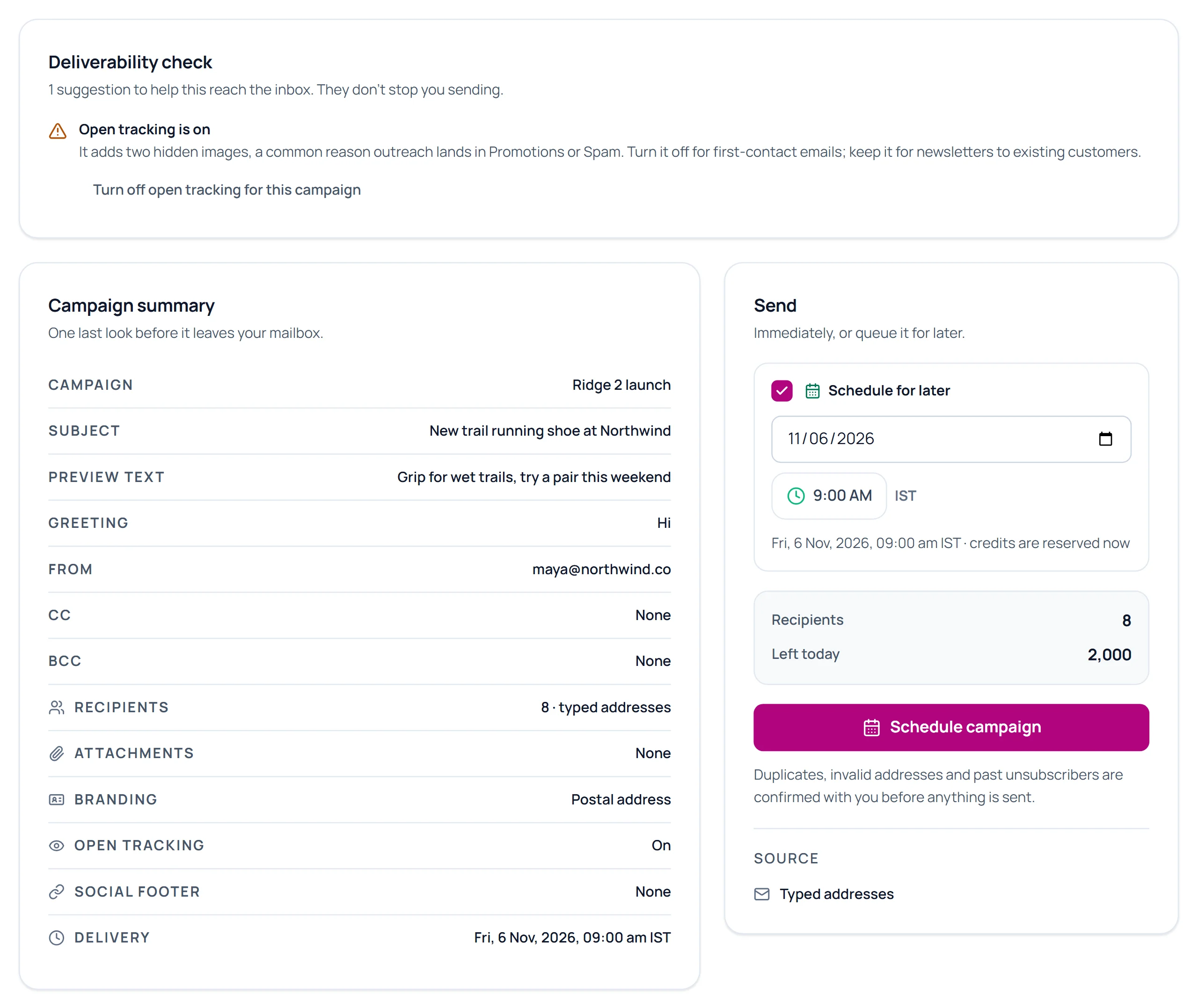
- Send or schedule — Check the preview, then send now or pick a date up to 60 days ahead.
Everything a campaign needs
- Your Own Gmail or Outlook — Campaigns go out from your connected Gmail, Workspace, Outlook or Microsoft 365 address, so replies come straight back to you.
- Personalised for Each Person — Use {name} and {company} in the subject and body, or give a row in your file its own subject and message.
- Write With AI — Describe the email and AI writes it in the tone you pick, from professional to persuasive. Or start from a ready template.
- Your Branding — Add your logo, address, social links, a signature and attachments of up to 20 MB.
- Lists and Segments — Save lists, follow up with people who opened or didn't, or send to a segment from Lead Intelligence.
- Schedule for Later — Pick a date and time up to 60 days ahead. Scheduled sends show on your content calendar next to your social posts.
Write and schedule a campaign
Screenshots from the MarketNOW dashboard with sample data for an example store. The email was written by Write with AI from a short brief.
Built to land in the inbox
- Paced to Your Mailbox — Sending follows your mailbox's daily limit, from 500 a day on Gmail to 10,000 on Microsoft 365. Anything over waits for the next day and goes out on its own.
- Optional Warm-up — Turn on warm-up for a new mailbox and MarketNOW starts at 20 emails a day, growing to 400 over five weeks.
- Automatic Unsubscribe — Every email gets an unsubscribe link, and people who unsubscribe or complain are never emailed again.
- Do-Not-Email List — Add or import addresses you must never contact; they are skipped on every campaign.
- Automatic Retries — If a send fails for a temporary reason, MarketNOW tries again up to three times.
See who opened
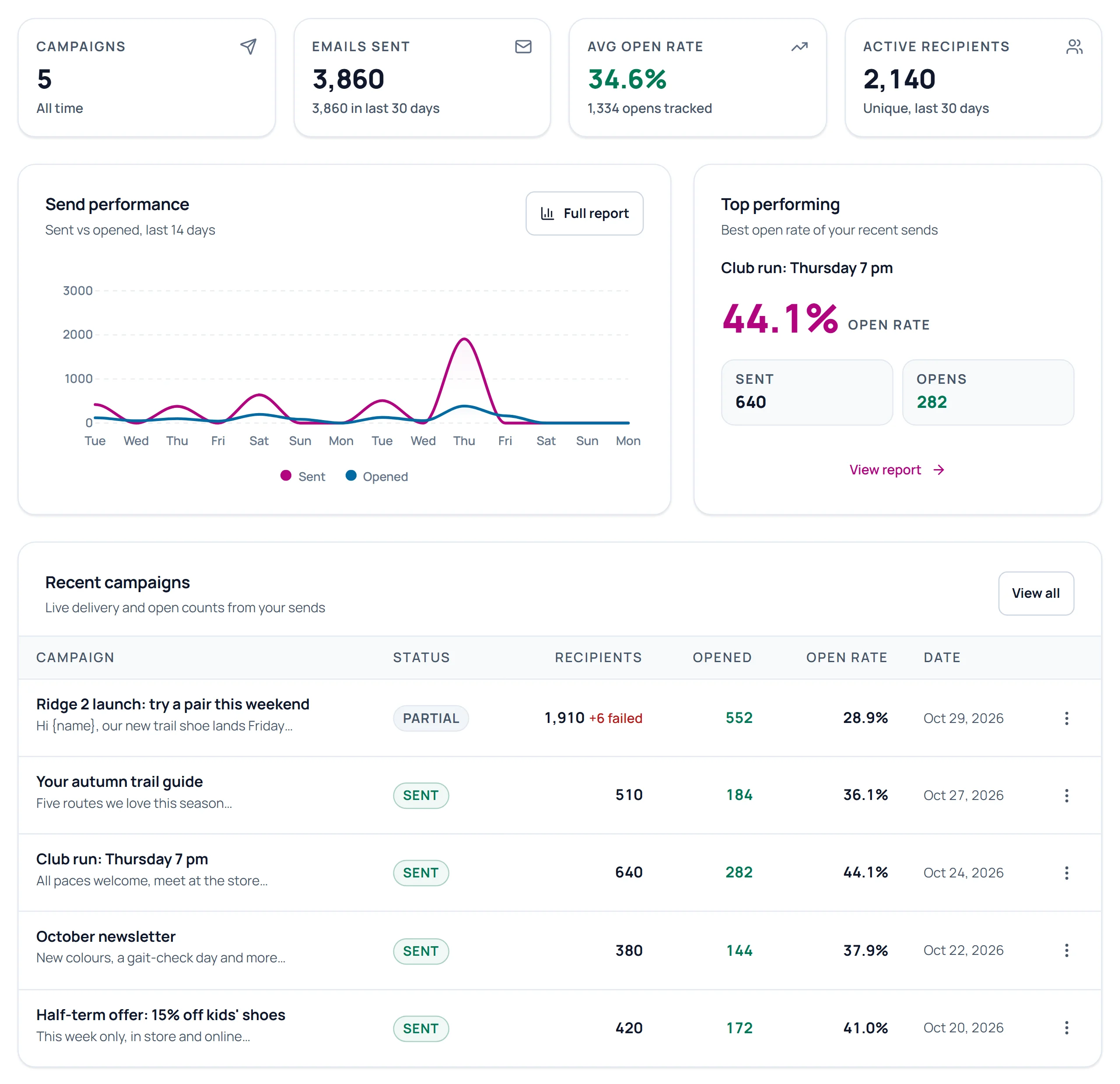
- Campaign Dashboard — Campaigns, recipients, open rate and a 14-day chart of emails sent and opened.
- Who Opened — Open any campaign to see who opened it, who didn't and which sends failed.
- Export to CSV — Download the opened, not opened, failed or unsubscribed list for your own follow-up.
Your campaign results
A screenshot from the MarketNOW dashboard with sample data for an example store.
Plans and email allowances
Growth includes 15,000 emails a month (up to 500 a day), Pro 60,000 (2,000 a day) and Agency 200,000 (10,000 a day). Sending uses 1 credit for every 20 emails.
Need more, or sending on the free trial? Email packs add extra emails that never expire and work on any plan.
Send Your Next Campaign From Your Own Inbox
Upload a list, write it with AI and schedule it, with unsubscribes and pacing handled for you.
Frequently asked questions
What is email campaign management software?
It is software for sending one email to many people, personalised for each, and tracking the results. MarketNOW sends your campaigns from your own Gmail or Outlook, with AI writing, scheduling, open tracking and automatic unsubscribes.
Can I send bulk email from my Gmail or Outlook?
Yes. Connect Gmail or Google Workspace, or Outlook or Microsoft 365, and campaigns go out from that address. You sign in securely; MarketNOW never asks for your password.
How many emails can I send?
Up to 10,000 recipients per campaign. Growth includes 15,000 emails a month, Pro 60,000 and Agency 200,000, within your mailbox's own daily limit. Email packs add more.
How much does it cost?
Each email uses 1/20 of a credit, so 1 credit covers 20 emails. Writing an email with AI uses 5 credits. Emails from a pack don't use credits.
Can I personalise each email?
Yes. Add {name} and {company} to the subject or body, and they are filled in from your list. A row in your file can also carry its own subject and message.
How are unsubscribes handled?
Every email includes an unsubscribe link that works in one click without logging in. Anyone who unsubscribes, marks you as spam or is on your do-not-email list is skipped automatically.
Can I see who opened my email?
Yes. Each campaign shows who opened it and who didn't, and you can export either list. Open counts are an estimate, because some email apps load images automatically.