Schedule LinkedIn, Facebook and Instagram Posts From One Calendar
A LinkedIn scheduling tool that also publishes to your Facebook Page and Instagram. Write posts with AI in your brand voice, plan whole campaigns, schedule everything on one calendar and review posts as a team before they go live.
What is a LinkedIn scheduling tool?
A LinkedIn scheduling tool lets you write posts ahead of time and publish them automatically at the time you choose, so you can post consistently without being online at the right moment.
MarketNOW's Social Publisher does that for LinkedIn, and for your Facebook Page and Instagram account too, with AI writing, campaign planning and team approvals in the same place.
How to schedule posts in MarketNOW
- Connect your accounts — Sign in to LinkedIn, and to Facebook for your Page and the Instagram account linked to it.
- Write the post — Type it yourself, or let AI write it in your brand voice. Add an image or a video.
- Pick a date and time — Schedule it, or post it now. Every post appears on your calendar.
- See how it went — Check what was published, what is coming up and how your posts perform.
Write posts in your brand voice
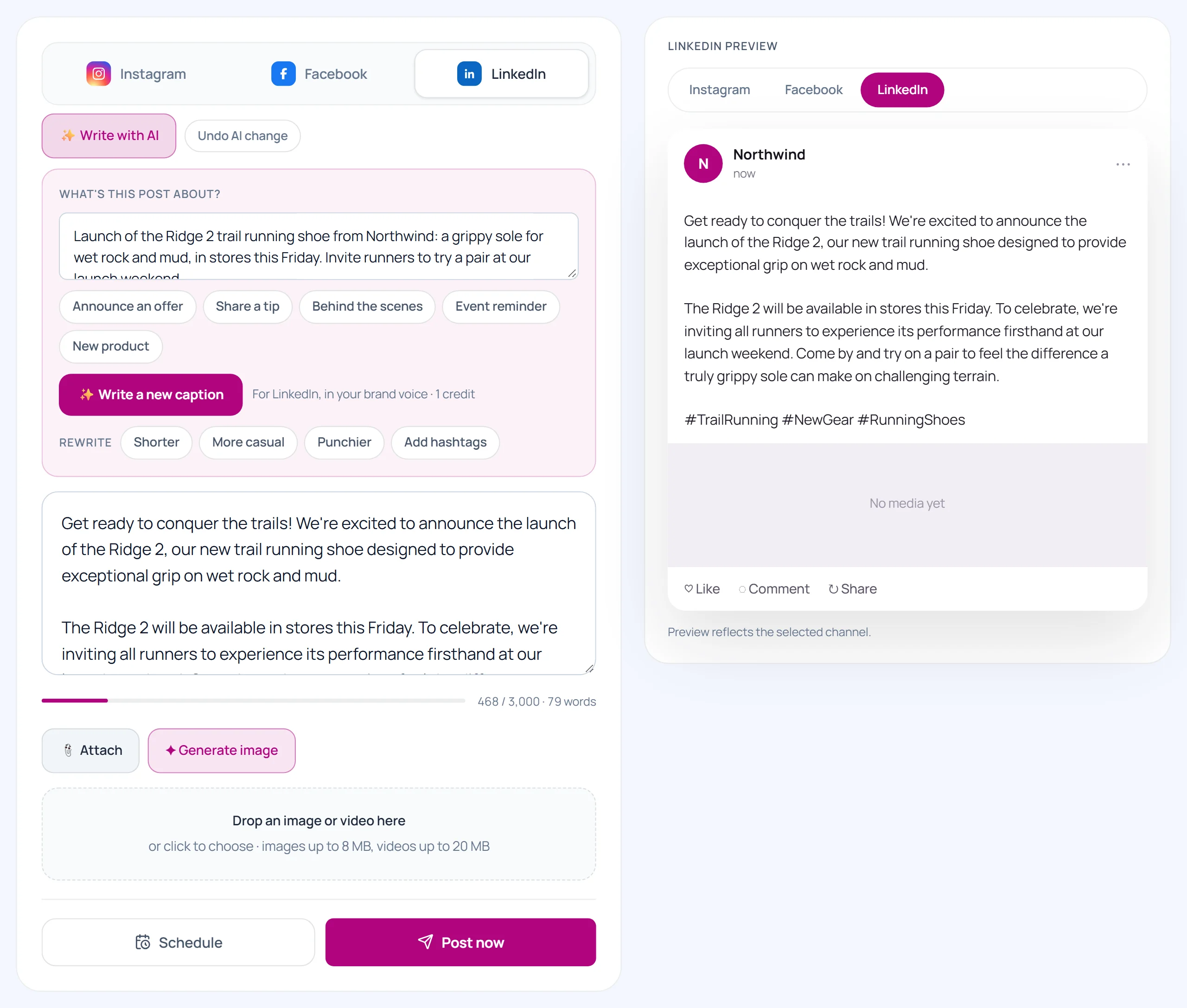
- Write with AI — Describe the post in a line, or pick an idea like an offer or a tip, and AI writes it for the channel you chose. Then make it shorter, more casual or punchier, or add hashtags.
- Your Brand Voice — Set the tone once: dials from professional to playful, emoji use, call-to-action style, reading level, and words to use or avoid. AI follows it on every post.
- Generate an Image — Describe a picture and generate it for the post, shaped for the channel: square for Instagram, wide for LinkedIn and Facebook.
- Built-in Checks — A character counter for each platform's limit, and a warning before you post something the platform won't accept.
- Live Preview — See how the post will look before it goes out.
See Write with AI in action
A screenshot from the MarketNOW dashboard with sample accounts for an example brand. The post itself was written by Write with AI from the one-line brief.
Plan a whole campaign in minutes
- Campaign Drafts — Set a goal, an audience and how often to post, and get up to twelve drafts across your chosen platforms, written in your brand voice.
- Target a Lead Segment — Aim a campaign at a segment you built in Lead Intelligence, or describe the audience in your own words.
- You Stay in Control — Drafts never post on their own. Edit them, discard them, then schedule one or schedule them all.
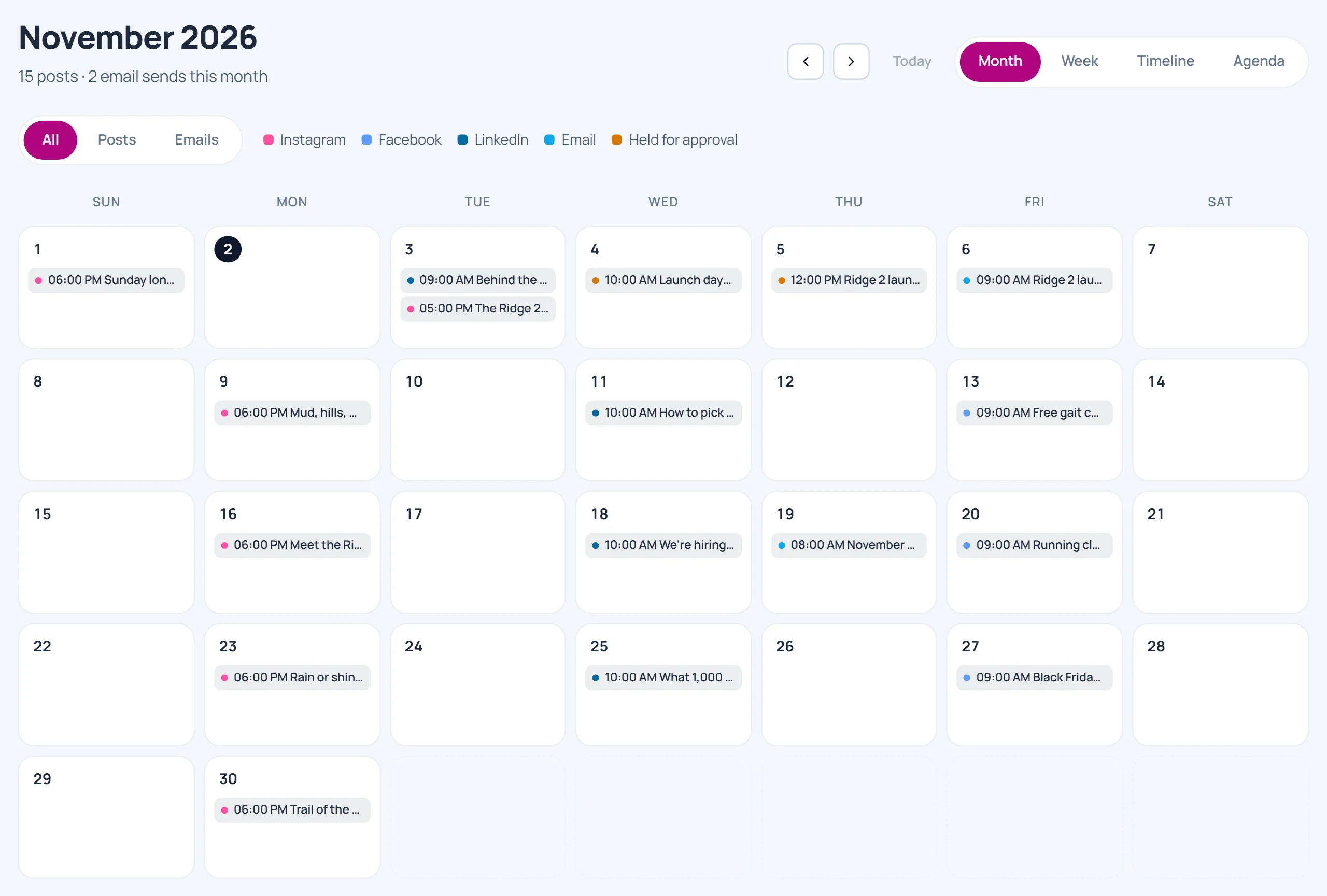
One calendar for every post
- Four Calendar Views — Month, week, timeline and agenda, with posts colour-coded by platform. Your email campaigns show on the same calendar.
- Edit, Reschedule, Retry — Open any post to edit it, move it to another time or retry it if it failed.
- Post Now, With Undo — Publish straight away, with a few seconds to cancel if you change your mind.
- Know When Something Fails — If a platform refuses a post, you get an alert in MarketNOW with the reason, so you can fix it and post again.
Review posts as a team
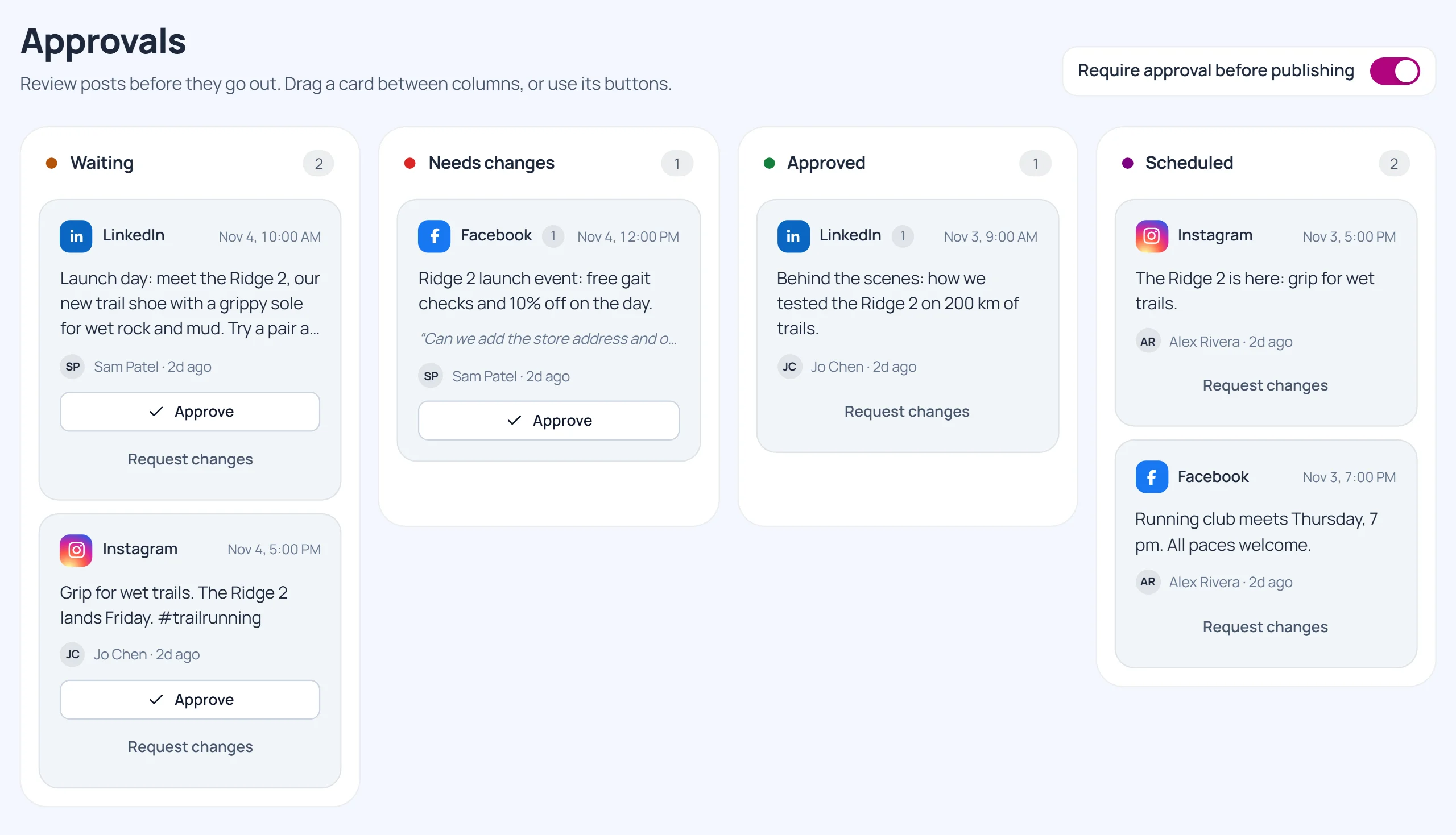
Turn on approvals for your organization, and nothing goes live until someone has signed it off.
- Approval Board — Posts move through Waiting, Needs changes, Approved and Scheduled, so everyone sees where each one stands.
- Comments and History — Ask for changes with a comment, edit and resubmit, and see every step a post went through.
- Clear Roles — Choose who can approve. Approvers are notified when a post is waiting for them.
Your calendar and approval board
Screenshots from the MarketNOW dashboard with sample data for an example brand, not a real customer.
See what works
- Social Analytics — Followers, likes, comments and engagement for your Facebook Page and Instagram account, over 7, 30 or 90 days or a custom range.
- Publishing Overview — What was published, what is scheduled and what failed, by day and by channel.
- ROI of Your Posts — LinkedIn posts you publish are added to ROI Analytics automatically, so you can log the revenue they bring in.
What each platform supports
LinkedIn: posts to your personal profile, with text, one image or one video, up to 3,000 characters.
Facebook: posts to your Facebook Page, with text or one photo.
Instagram: posts to an Instagram business or creator account linked to your Page, with one image and a caption of up to 2,200 characters.
Post Consistently Without the Daily Scramble
Write in your brand voice, plan the month on one calendar and let MarketNOW publish on time.
Frequently asked questions
What is a LinkedIn scheduling tool?
A LinkedIn scheduling tool lets you write posts in advance and publishes them at the time you set. MarketNOW's Social Publisher schedules LinkedIn posts, and posts to your Facebook Page and Instagram account too.
Which social networks does MarketNOW support?
LinkedIn, Facebook and Instagram. LinkedIn posts go to your personal profile, Facebook posts to your Page, and Instagram posts to a business or creator account linked to that Page.
Can I schedule posts to a LinkedIn company page?
Not yet. MarketNOW publishes to your personal LinkedIn profile today.
How much does it cost to publish a post?
Each published post uses 50 credits from your plan's balance. Writing with AI uses 1 credit, generating an image 5 credits and a campaign of drafts 6 credits. Scheduling, editing, approvals and analytics are free.
Can AI write my social media posts?
Yes. Write with AI drafts a post for the channel you choose, in the brand voice you set up, and can rewrite it shorter, more casual or punchier. Campaign drafts write up to twelve posts at once.
Can my team approve posts before they go live?
Yes. Turn on approvals for your organization, and every post waits on the approval board until someone with approval rights signs it off.
Can I post the same update to several networks at once?
Each post goes to one network, so the text and image fit that platform. To share an update everywhere, create a post for each network; a campaign can draft them for all your platforms in one go.